Can Meta Use Your Art for AI? What Artists Need to Know
Episode 128 | Paint Rest Repeat Podcast for Artists
In a Nutshell In October, Meta proposed new terms for anyone using Facebook or Instagram for business. As written, they would have let Meta send bots to collect content from the websites linked to those accounts, including images of your artwork. There was no separate way to say no. After strong pushback from publishers and regulators, the changes have been paused, so right now nothing has changed.
It’s still a helpful nudge to ask a bigger question: if social media disappeared tomorrow, how would you stay in touch with the people who love your work? In this post, I explain what the terms said in plain language and how this differs from tools like ChatGPT and Claude. I also share three small steps to keep your art business on your own turf, plus a few optional extras if you’d like to go further.
Here for the links mentioned in the episode?
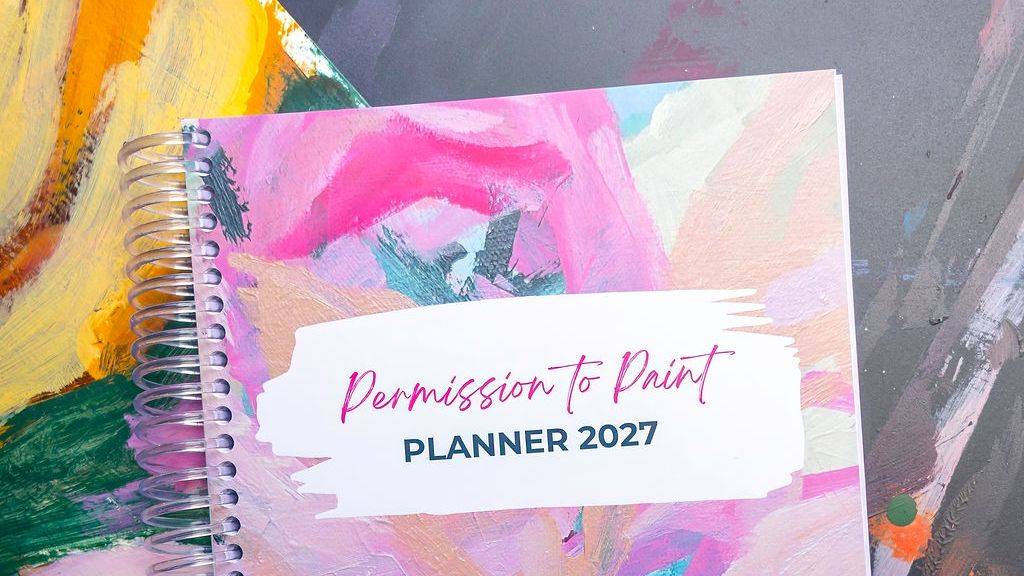
The 2027 Permission to Paint Planner: https://www.permissiontopaint.co/planner
Send me your question for the podcast: https://www.permissiontopaint.co/podcast
Join my email list: https://www.permissiontopaint.co/stay-connected
Episode 128: Listen using the player below, or click your favourite listening platform to subscribe and listen there.
You can breathe out (for now)
Some artists I know stepped away from Facebook and Instagram altogether when the news about Meta’s new business terms broke.
I completely understand why. When something you’ve worked hard to build suddenly feels out of your hands, it’s unsettling.
So let’s start with the good news. The changes have been paused. For now, nothing has changed.
But this moment has handed us something genuinely useful: a chance to look at where our art businesses actually live. Let’s make the most of it, minus the panic.
What Meta’s new business terms actually said
Here’s the short version, without the legal jargon.
Meta is the company that owns Facebook, Instagram, WhatsApp and Threads.
In October, Meta announced changes to its terms for anyone using its platforms for business. That covers running a Facebook page or group, posting ads, listing products or using Meta Business Suite. If you use Facebook or Instagram to share and sell your art, that very likely includes you.
The new terms would have let Meta crawl, or “scrape”, the websites linked to those business accounts. That means your online shop, the link in your bio and your product pages.
The original wording said Meta could use that content to develop and train its own products, which could include its AI. After the first wave of criticism, Meta removed the word “train” and said the update was about pulling accurate product information for ads. The permission to crawl stayed.
There was also no separate opt-out. Continuing to use Meta for your business would have counted as agreeing.
What “scraping” means
Scraping means sending automated software (often called bots) to visit a website and collect what’s on it.
For artists, that’s your images, your descriptions and your prices.
For artists, this was about consent
A lot of the conversation focused on copyright, and that matters.
For artists, though, the bigger concern was consent. Images of your artwork could have been collected and used without anyone actually asking you.
Choosing to share your work is very different from having it taken.
Where things stand now
There was strong pushback from publishers and regulators around the world. A court in Norway temporarily suspended the terms there, and the UK’s competition regulator opened an investigation.
Meta first delayed the start date. Then, at the end of October, it paused the change while it consults with industry groups. In early November, Meta confirmed the new terms won’t take effect as planned and took them down. There’s no new date, and its existing terms stay in place in the meantime.
So right now, nothing has changed. But it’s a really good reminder of why it’s smart to have a home base you own.
Isn’t this the same as ChatGPT or Claude reading your website?
It’s a fair thing to wonder. There are two big differences: whether you’re asked, and how much access they get.
Difference 1: Whether you get a say
Lots of tech companies send bots to read public websites. That part isn’t new.
With ChatGPT and Claude, you get a say. There’s a simple instruction you (or whoever looks after your website) can add that says, “please don’t use my content to train your AI.” Both companies have committed to honouring it. You can even say no to training and still show up when people use AI to search.
With Meta, the permission was built into the terms of using Facebook and Instagram for business. Meta has since said publicly that it will respect that same “please don’t” instruction, but the terms themselves didn’t offer a way to say no. On paper, the only real opt-out was to stop using Meta for your business altogether.
Difference 2: How much access they get
Most bots only see what any visitor sees. Meta’s terms also allowed it to create its own log-ins to get into those websites.
For most artists, that’s not a big concern, because our sites are mostly public anyway. But it showed just how far the permission reached.
Here’s how I think about it. Imagine a market organiser saying, “To have a stall here, you also agree we can come to your shop down the road, let ourselves in with our own key, look around, and take notes and photos to help us develop our own products.”
I don’t know about you, but I’d want to be asked first.
Learning from creative work isn’t unique to Meta. Most AI companies do it. The difference here was that you didn’t get a say, and the access went further than an ordinary visitor’s.
Rented land vs your own turf
Setting the Meta news aside for a moment, platforms change their rules all the time, often for reasons that have nothing to do with us. That’s just how they work.
Social media is a wonderful place to be seen. It’s just not a great place to live.
That’s where the idea of rented land and your own turf comes in.
Rented land is anything you don’t control: Instagram, Facebook, Pinterest and TikTok. You’re a tenant there, and the landlord sets the rules.
Your own turf is what belongs to you: your website, your email list, your images, and your relationships with your collectors. Whether you met them online, at a market, through a gallery or in your community, those connections are yours.
I touched on this in How I Started Selling My Art. Starting an email list was one of the best decisions I made, because it’s something that’s actually mine.
One question worth asking yourself
Grab a notebook and sit with this for a minute:
If social media disappeared tomorrow, how would I stay in touch with the people who love my work?
Jot down whatever comes to mind.
If your list is short, that’s okay. It doesn’t mean you’ve done anything wrong. It just shows you where to start.
Social media still has a place
This isn’t about quitting Instagram or feeling guilty for enjoying it.
Social media is free, and it’s often where people discover your work for the very first time. That’s valuable.
The aim is to gently invite those people somewhere more personal, like your website or your email list, where they can really get to know you and your work.
A resilient art business is one that can stand on its own two feet. Social media can absolutely be part of that. It just shouldn’t be holding up the whole thing.
(If being visible online drains your energy, my conversation with Leah Mariani about marketing your art as an introvert is a lovely companion listen.)
3 small steps to strengthen your art business
You don’t need to overhaul everything. Here are three small steps, from quickest to biggest.
This week: Back up your best images
Save your best artwork images somewhere other than social media, like your computer, a hard drive or cloud storage.
If a platform changes, or an account gets locked, your images are still safely with you.
This month: Start collecting emails
It can be as simple as a sign-up form on your website. Or you could ask buyers at your next market if they’d like to hear about new work.
While you’re at it, make a list of your past buyers. That way you can stay in touch with them, even if a platform changes.
Over time: Build a website that’s yours
If you don’t have a website yet, think about building one.
It doesn’t need to be fancy. It just needs to be yours.
That’s it. You don’t need to do all three today. Just pick the one that feels most doable. If it helps, give it a date in your diary. (I share simple ways to do that in How to Turn Your Art Dream into Reality.)
Want to go a step further? Optional extras
These are completely optional. Pick one or two that feel useful, and leave the rest.
Menu names on apps and websites change often. If something looks a little different on your screen, look for the closest match.
1. Check your Instagram “Sharing and reuse” setting (5 minutes)
Go to your Profile → menu (three lines) → Sharing and reuse. Look for the option about allowing people to use your content with AI features on Meta, and switch off Posts and Reels.
Good to know: This setting controls whether other people can use your posts with Meta’s AI tools. It doesn’t stop Meta itself from using public posts to train its AI. It’s still a sensible setting to check.
2. Can you object to Meta using your posts for AI training? It depends where you live
- UK and EU: Yes, you have a legal right to object. Go to Settings → Privacy Centre → AI at Meta (or “How Meta uses information for generative AI models”). Look for the “Right to object” or “Submit an objection request” link, and keep your confirmation email.
- Australia and the US: Unfortunately, there’s no formal opt-out at this stage, because our privacy laws don’t currently require one. If you can’t see an objection link, that’s why. You haven’t missed it.
3. Ask AI bots not to train on your website (10 minutes)
Most website builders now have a simple way to tell AI companies, “please don’t use my content for training.”
- Squarespace: Settings → Crawlers → tick “Block known artificial intelligence crawlers.”
- Wix: Use the Robots.txt Editor in your SEO settings.
- Shopify, WordPress and others: Ask your website host or developer how to edit your robots.txt file.
If you’re editing robots.txt yourself, these lines ask Meta’s AI training bot to stay away:
User-agent: Meta-ExternalAgent
Disallow: /
A few reassuring notes:
- This won’t stop your links showing a preview picture when you share them on Facebook or Instagram. A different bot handles that.
- You can block AI training and still appear when people use AI tools to search.
- It works like a polite “please don’t” sign rather than a lock, and changes can take up to 24 hours to apply. The big companies, including Meta, OpenAI and Anthropic, say they honour it.
4. Download a copy of your Instagram and Facebook content
Meta lets you download your photos, captions and posts. Look in Accounts Centre → Your information and permissions → Download your information.
Save it alongside your original high-res image files.
5. Build your email list the right way
Whether it’s a sign-up form on your website or a clipboard at your next market, always ask permission first. Say who you are, and make unsubscribing easy.
- Australia: The Spam Act requires consent before you email someone.
- UK: You generally need consent too.
- US: The rules are looser, but asking first is still best practice, and it builds trust with your collectors.
Remember, you don’t need to do all of these. Even one step puts more of your art business on your own turf.
Keep your foundations in your own hands
AI and what it means for artists is a much bigger conversation, and one I’ll come back to in future episodes.
For now, here’s the one thing I’d love you to take away: keep your foundations in your own hands.
We’re building art businesses for the long haul, so let’s make choices that support that.
If there’s an upside to all of this, it’s a chance to make sure your art business has a home that’s yours, whatever the platforms decide next.
Have a question about this topic, or anything else art or art business related? Send it to me here. And you’re very welcome to join my email list, so we can stay connected beyond social media.
Put your plans somewhere no platform can change the rules
If you’d love a place to capture your answer to today’s question, along with all your plans for next year, the 2027 Permission to Paint Planner is made for exactly that.
It’s a place to set your intentions, plan your creative goals and map out how you’ll build these foundations in your art business, at your own pace.
Inside, you’ll find:
- Task lists to get everything out of your head
- Weekly focus areas to keep your priorities clear
- Daily priorities, so you always know your top three
It’s designed specifically for artists, so it’s simple, not over-engineered. Whether you paint purely for joy or you’re building an art business, it’s about making space for the art that matters most to you.
The digital planner is $49 AUD. There’s also a small run of signed, spiral-bound A5 printed copies, and only a handful are left ($80 AUD, including shipping within Australia). There’s something lovely about having your plans on paper, on your own desk, where no platform can change the rules.
If you’re ready for more personalised support in building your art business, there are plenty of ways we can work together, from self-paced courses and practical resources to memberships and masterminds. Reach out here.
Ros x
Ros Gervay is an Australian artist and creative business coach who helps artists build sustainable, income-generating art businesses without burnout or compromise. She is the founder of Art for the Heart (AFH), an online membership community for artists at all stages, and the creator of the Thrive Mastermind, a professionalisation container for artists ready to grow beyond the learning stage. Ros hosts the Paint Rest Repeat podcast, where she shares honest conversations about the art life, creative business, and what it really takes to get paid to do what you love. Based in Australia and working with artists worldwide. Learn more at permissiontopaint.co.
Frequently Asked Questions
Can Meta use my art to train its AI? It depends on where your art lives. Meta already uses public Facebook and Instagram posts to train its AI, and in Australia and the US there’s no formal opt-out. The paused business terms were about something different: crawling the websites linked to business accounts, like your online shop. Those changes haven’t come into effect.
Did Meta’s new business terms come into effect? No. They were due to start on 30 October 2026, then moved to 20 November. Meta has now paused them indefinitely while it consults with industry groups, and its existing terms remain in place.
How is Meta’s scraping different from ChatGPT or Claude reading my website? There are two main differences. With ChatGPT and Claude, you can ask them not to use your website for AI training, and they’ve committed to honouring that. Meta’s proposed terms didn’t include a way to say no. Meta’s terms also allowed it to create its own log-ins, which goes further than an ordinary visitor’s access.
Can I stop AI companies training on my website? You can ask them to. Many website builders, including Squarespace and Wix, let you block known AI training bots through your settings or your robots.txt file. It works like a polite “please don’t” sign rather than a lock, but the major AI companies say they honour it.
Should I leave Instagram and Facebook? That’s entirely your call. Social media is free and often where people discover your art for the first time, so it can still play a valuable role. The key is not to rely on it alone. Gently invite people to your website and email list, where the relationship is yours.
What’s the simplest first step to protect my art business? Back up your best artwork images somewhere other than social media this week, such as your computer, a hard drive or cloud storage. From there, start collecting emails, make a list of past buyers, and build a simple website over time.